Shopify is retiring script tags: keep Zalify running after March 1, 2027
Shopify stops loading app script tags on March 1, 2027. If your store installed Zalify a while ago, turn on the Zalify Pixel app embed so popups, forms and ad pixels keep working.
On March 1, 2027, Shopify stops loading script tags on online store pages. Script tags are an old way for apps to add JavaScript to a storefront. Older versions of the Zalify app used one to load the Zalify Pixel.
If your store still loads Zalify only through that script tag, Zalify will stop running on your storefront that day, with no error anywhere. Turning on the Zalify Pixel app embed takes a minute and prevents this.
Who this affects
- Shopify stores that installed Zalify before April 2026. The Zalify app no longer adds script tags, but tags it added earlier stay on your store until Shopify's cutoff.
- Stores where the Zalify Pixel app embed is off. If the app embed is already on, you're set: the Pixel loads through the embed, and when the old script tag loads a second copy, that copy does nothing.
Sites that add the Pixel snippet to their own code, including headless storefronts and stores with the snippet pasted into the theme, are not affected.
What stops if you do nothing
Everything the Zalify Pixel does on your storefront pages:
- Popups and embedded forms stop appearing, so you stop collecting sign-ups.
- Browser-side ad pixels for Meta, Google, TikTok and the other platforms you connected in Zalify stop sending events.
- On-site tracking that runs in the page stops.
Turn on the Zalify Pixel app embed
Open your theme editor
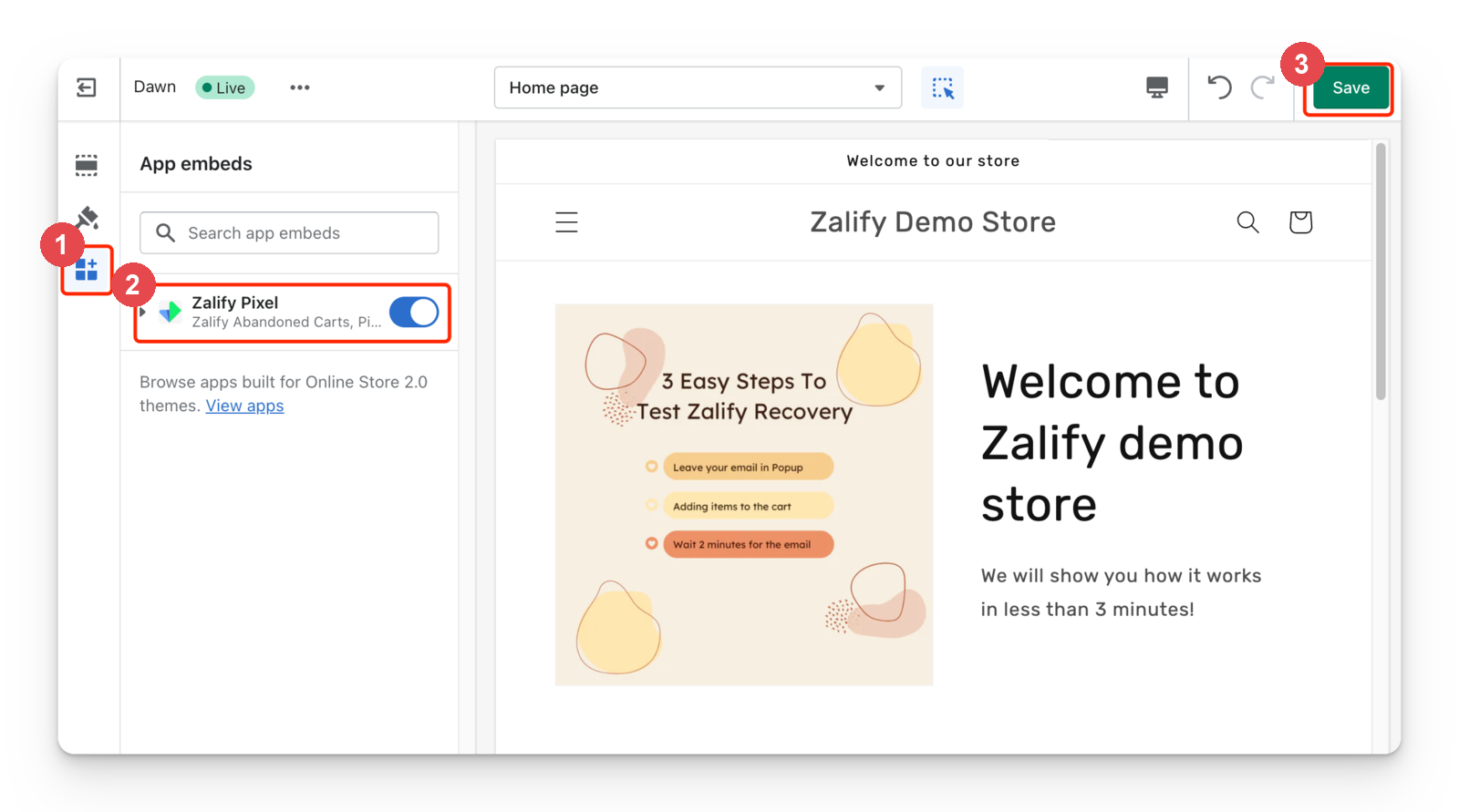
In Shopify admin, go to Online Store → Themes, then click Customize on your live theme.
Open App embeds
In the theme editor sidebar, open the App embeds panel (the puzzle-piece icon).
Turn on Zalify Pixel
Find Zalify Pixel and toggle it on.
Save
Click Save in the top-right corner.
You don't need to remove the script tag
The old script tag can stay until Shopify retires it. While both are present, the Pixel runs once.
Check the Zalify app pixel too
Checkout and purchase events reach Zalify through a different route: the Zalify app pixel in Shopify's Customer events. Shopify doesn't let apps add JavaScript to checkout, so this pixel is how Zalify sees checkouts and orders, and attribution is built from it. Script tags have nothing to do with it, and it doesn't need the app embed.
Zalify installs the app pixel for you once your store has granted the pixel permissions. To check it, see Zalify's app pixel in Shopify Customer events.
Verify
Open your storefront with Preview Mode on and confirm that page views fire and your popup shows. See Test your setup with Preview Mode.
Next steps
- Install the Zalify Pixel on Shopify: the full install guide, including consent
- Zalify's app pixel in Shopify Customer events: check checkout and purchase tracking
- "My pixel isn't tracking" checklist