How to Obtain a Shopify Collaborator Request Code?
How to Obtain a Shopify Collaborator Request Code?
Introduction
If you're a Shopify merchant looking to give developers or agency partners access to your store, you'll need to generate a collaborator request code. This guide will show you how.
Steps
Log into Your Shopify Admin
Visit Shopify's login page and sign in.
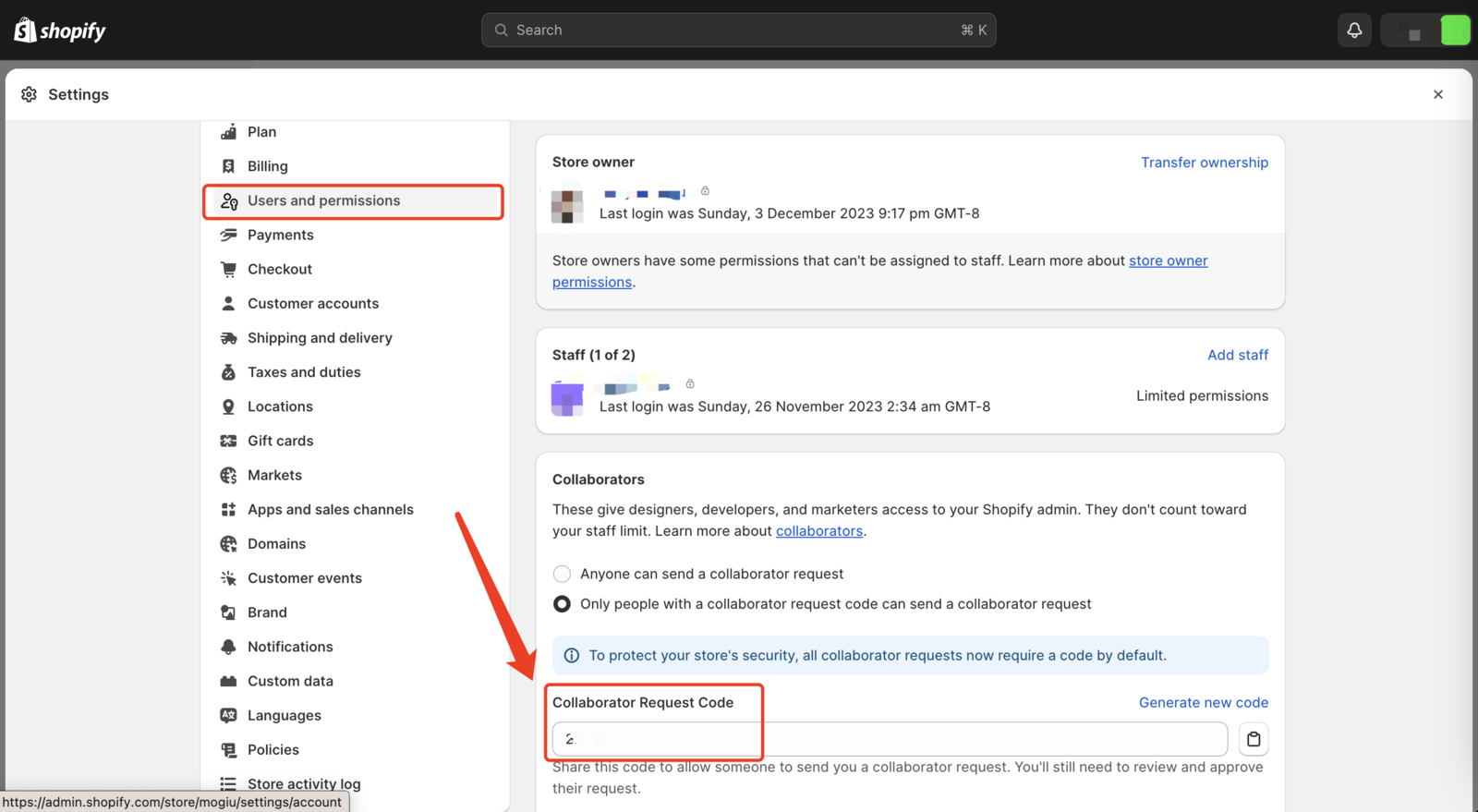
Go to 'Settings'
Click on the 'Settings' icon in your Shopify admin dashboard.
Select 'Users and Permissions'
Find this option in the 'Settings' menu.
Navigate to the 'Collaborators' Section
Scroll to the 'Collaborators' section in 'Users and Permissions'.
Find the Collaborator Request Code
Your unique collaborator request code will be displayed here.
Share the Code
Copy and securely share this code with your collaborator.
Conclusion
This code allows safe, limited access to your Shopify admin, ensuring security while facilitating collaboration.