在 Shopify 安装 Zalify Pixel
通过主题应用嵌入启用像素,并自动对接 Shopify 的用户隐私设置。
在 Shopify 中无需手动粘贴像素代码。Zalify 通过主题应用嵌入(App embed)加载像素,启用后也会对接 Shopify 的授权系统。
开始前
- 已安装 Zalify;尚未安装时,先阅读Zalify 入门。
- 拥有可以编辑主题的店铺管理员权限。
启用像素应用嵌入
1
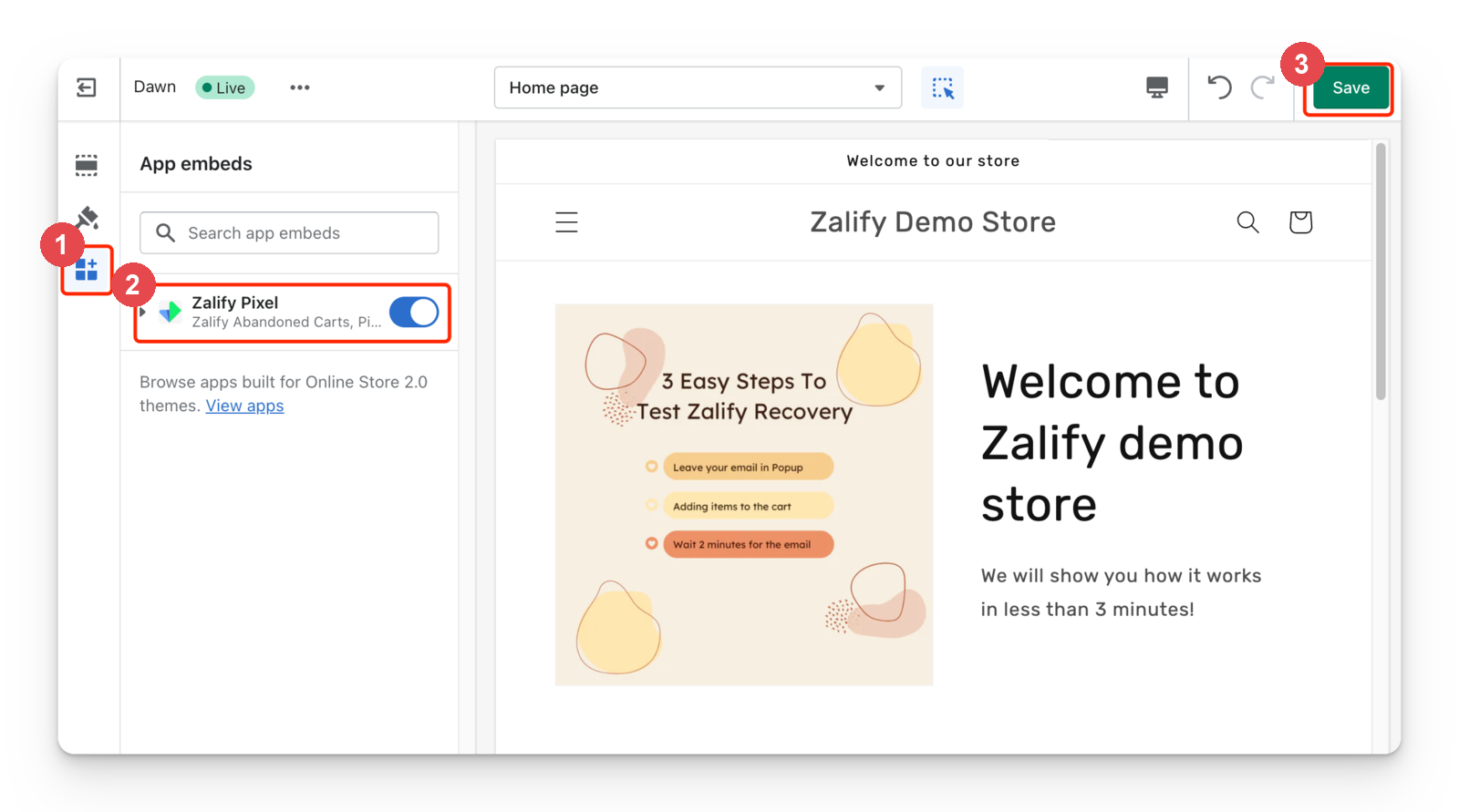
打开主题编辑器
在 Shopify 后台进入 Online Store → Themes,在当前上线主题上点击 Customize。
2
打开应用嵌入
在侧栏选择 App embeds,通常为拼图图标。
3
启用 Zalify
找到 Zalify Pixel,打开开关。它会在店铺各页面加载像素,并自动带入工作区配置。
4
保存
点击右上角 Save,使配置在店铺生效。
2026 年 4 月之前安装了 Zalify?
店铺可能仍通过旧的 Script Tag 加载 Zalify,Shopify 将于 2027 年 3 月 1 日停止加载 Script Tag。即使 Zalify 目前运行正常,也请按上述步骤启用应用嵌入,详见 Shopify 停用 Script Tag。
结账和购买:应用像素
应用嵌入在店铺页面上运行。结账和购买事件通过 Shopify 客户事件中的 Zalify 应用像素进入 Zalify,由 Zalify 自动安装。检查是否已连接,见迁移到 Shopify 客户事件像素。
自动读取授权状态
如果店铺提供 Shopify customer-privacy API(window.Shopify.customerPrivacy.analyticsProcessingAllowed),像素会自动接入:
- 启动时读取访客授权状态。
- 监听 Shopify 的
visitorConsentCollected事件。 - 忽略手动设置的
consentStorageKey参数。
无需配置手动参数
在 Shopify 隐私与授权设置已启用且 API 可用时,像素会按这些设置处理授权。其他网站使用的手动参数无需在此重复配置,详见配置追踪授权。
验证安装
打开店铺的预览模式,观察事件触发,见使用预览模式测试。