Installer Zalify
/
1 min read
How to Obtain a Shopify Collaborator Request Code?
How to Obtain a Shopify Collaborator Request Code?
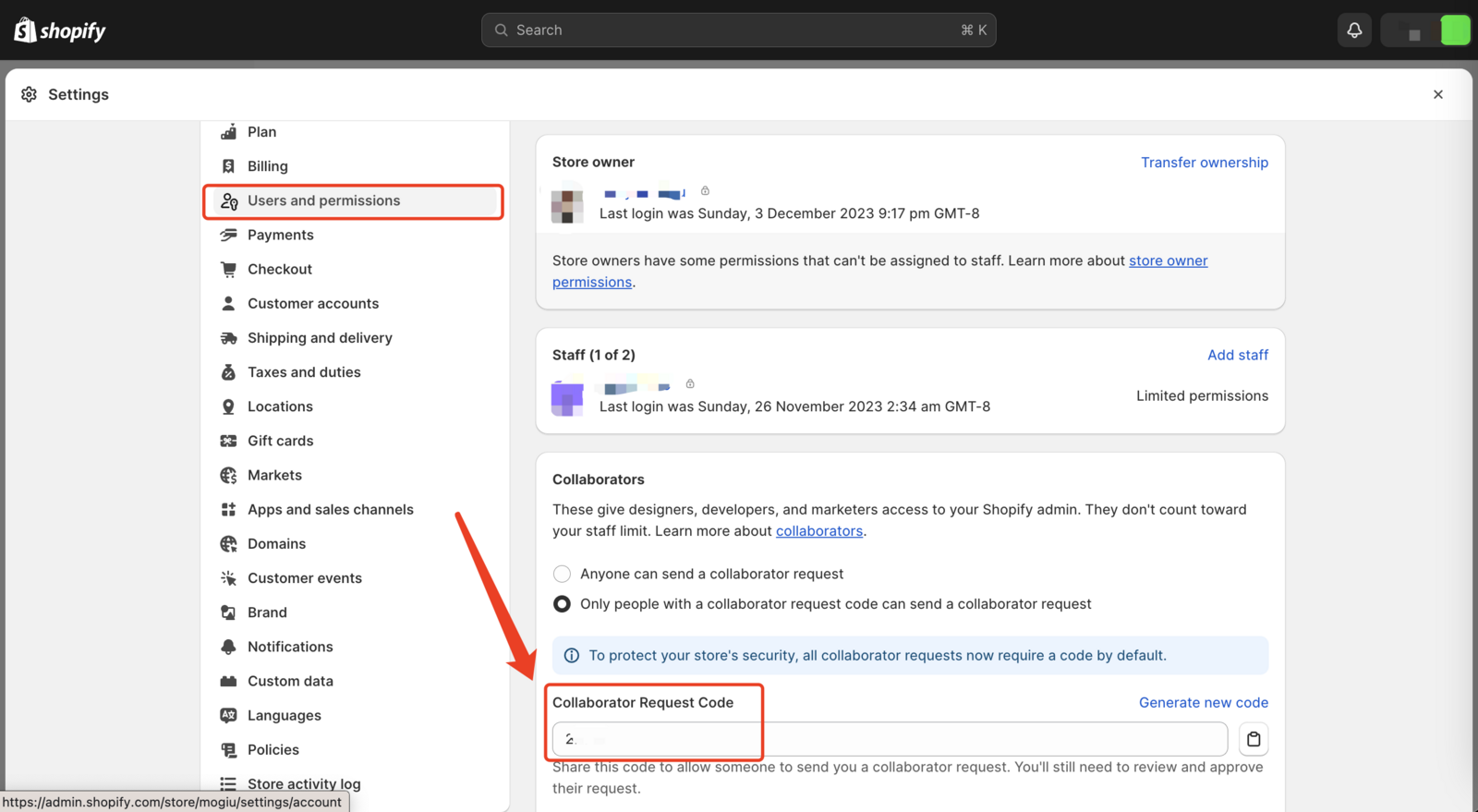
How to Obtain a Shopify Collaborator Request Code
Introduction
If you're a Shopify merchant looking to give developers or agency partners access to your store, you'll need to generate a collaborator request code. This guide will show you how.
Steps
-
Log into Your Shopify Admin
Visit Shopify's login page and sign in. -
Go to 'Settings'
Click on the 'Settings' icon in your Shopify admin dashboard. -
Select 'Users and Permissions'
Find this option in the 'Settings' menu. -
Navigate to the 'Collaborators' Section
Scroll to the 'Collaborators' section in 'Users and Permissions'. -
Find the Collaborator Request Code
Your unique collaborator request code will be displayed here. -
Share the Code
Copy and securely share this code with your collaborator.
Conclusion
This code allows safe, limited access to your Shopify admin, ensuring security while facilitating collaboration.